
Display in CSS ek important property hai jo layout control karta hai. Ye decide karta hai ki koi HTML element block hoga ya inline.
Har HTML element ka ek default display value hota hai:
- Mostly
blockyainline
display property ka use karke tum kisi bhi element ka default behavior change kar sakte ho.
Display in CSS – Block-level Elements
Block-level elements:
- Hamesha new line se start hote hain
- Full width lete hain (left se right tak)
Examples:
<div><h1> - <h6><p><form><header><footer><section>
Display in CSS – Inline Elements
Inline elements:
- New line se start nahi hote
- Sirf utni width lete hain jitni zarurat ho
Examples:
<span><a><img>
Common Values
display property ke kuch important values:
| Value | Description |
|---|---|
| inline | Element inline ban jata hai |
| block | Element block ban jata hai |
| contents | Container remove ho jata hai, sirf children rehte hain |
| flex | Element flex container ban jata hai |
| grid | Element grid container ban jata hai |
| inline-block | Inline jaisa behave karta hai but height, width apply hota hai |
| none | Element completely hide ho jata hai |
Display in CSS – Override Default Value
Tum kisi element ka default display change kar sakte ho.
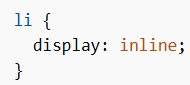
Example 1: <li> ko inline banana (horizontal menu)
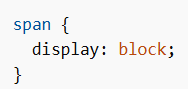
Example 2: <span> ko block banana
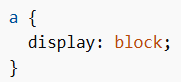
Example 3: <a> ko block banana
Note:display change karne se element ka type change nahi hota.
Inline element ko block banane par bhi wo block elements ke rules follow nahi karega internally.
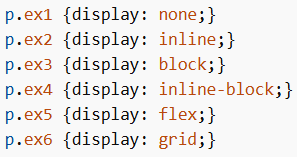
More Values Example
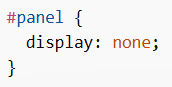
Display in CSS – Hide Elements
display: none
- Element completely hide ho jata hai
- Page me koi space nahi leta
Example:
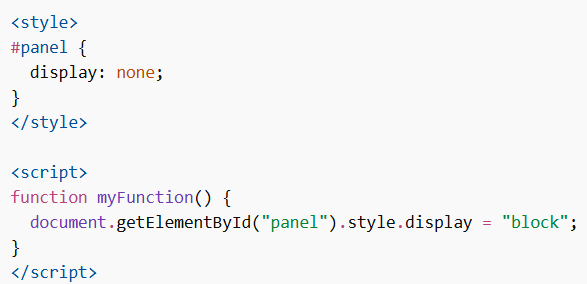
JavaScript se Show/Hide
Show element:
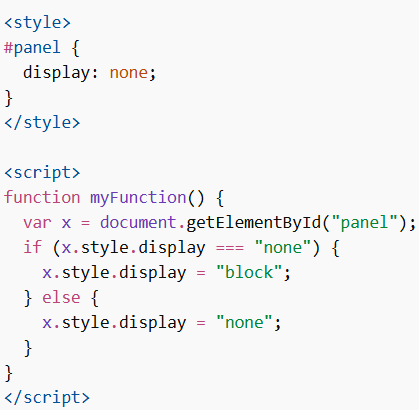
Toggle show/hide:
CSS Display vs Visibility
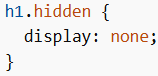
display: none
- Element remove ho jata hai
- Space nahi leta
Example:
visibility: hidden
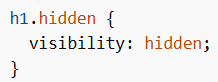
- Element invisible hota hai
- Lekin space still leta hai
Example:
Display in CSS ek core property hai jo web layout control karti hai. Iska use karke tum elements ko block, inline, flex, grid ya hidden bana sakte ho.
Proper use se:
- Layout clean hota hai
- Responsive design improve hota hai
- UI control better hota hai
