Lists in CSS – Styling Lists
HTML me do main types ke lists hote hain:
<ul>→ unordered list (bullets ke saath)<ol>→ ordered list (numbers ya letters ke saath)
Lists in CSS me in lists ko style karne ke liye ye properties use hoti hain:
list-style-type→ list marker ka type set karta hailist-style-image→ marker ki jagah image use karta hailist-style-position→ marker ki position set karta hailist-style→ shorthand property
Lists in CSS – List-item Markers
list-style-type property list ke marker ka type define karta hai.
Example:
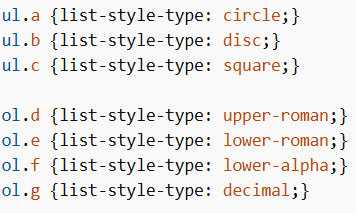
Note: Kuch values unordered lists ke liye hoti hain aur kuch ordered lists ke liye.
Lists in CSS – Replace Marker with Image
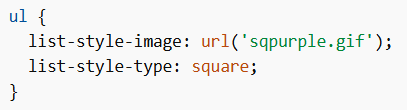
list-style-image property marker ko image se replace karti hai.
Note: Hamesha list-style-type bhi likhna chahiye fallback ke liye.
Example:
Lists in CSS – Position of Markers
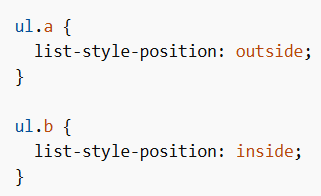
list-style-position marker ki position define karta hai.
outside→ default, marker bahar hota haiinside→ marker text ke andar hota hai
Example:
Lists in CSS – Remove Markers
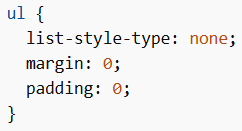
list-style-type: none; use karke markers remove kiye ja sakte hain.
Note: Default margin aur padding bhi remove karna hota hai.
Example:
CSS Lists– Shorthand Property
list-style shorthand property hai jo saari list properties ek line me set karta hai.
Order:
- list-style-type
- list-style-position
- list-style-image
Agar koi value missing ho, to default value use hoti hai.
Example:

CSS Lists – Styling with Colors
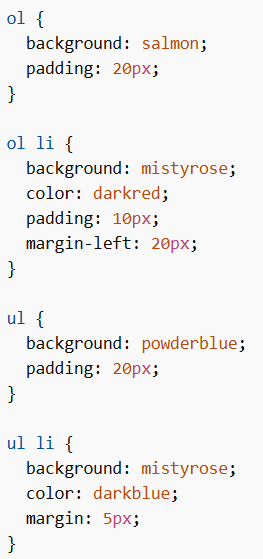
Lists ko colors, margin aur padding ke saath style kiya ja sakta hai.
<ul>ya<ol>par styling → poori list par apply hoti hai<li>par styling → individual items par apply hoti hai
Example: