
ComputerCode in HTML ka use web pages par computer code, keyboard input, program output aur variables ko properly display karne ke liye hota hai. HTML me kuch special elements hote hain jo ComputerCode content ko clearly show karne me help karte hain.
HTML ComputerCode Elements
ComputerCode in HTML ke liye kuch special tags use kiye jaate hain jo programming related text ko represent karte hain.
HTML <kbd> – Keyboard Input ke liye
<kbd> element keyboard se diye gaye user input ko show karne ke liye use hota hai. ComputerCode in HTML me yeh element user ko batata hai ki kaunsa key press karna hai.
Example:

Result:
Press Ctrl + C to copy text.
HTML <samp> – Program Output ke liye
<samp> element computer program ke sample output ko define karta hai. ComputerCode in HTML me yeh tag program ke result ko represent karta hai.
Example:

Result:
Program Output: Hello World
HTML <code> – Computer Code ke liye
<code> element programming code ka chhota part define karne ke liye use hota hai. ComputerCode in HTML me yeh tag code snippets ko display karne ke liye common hai.
Example:

Result:
The HTML button tag defines a clickable button.
Line Breaks Preserve Karna
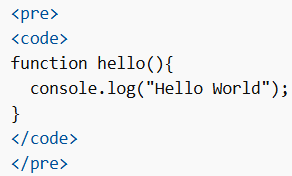
<code> element extra spaces aur line-breaks preserve nahi karta. Agar formatting same rakhni ho to <pre> tag ke andar <code> use karna chahiye. ComputerCode in HTML me yeh method code formatting maintain karta hai.
Example:
HTML <var> – Variables ke liye
<var> element programming ya mathematical expressions me variables define karne ke liye use hota hai. ComputerCode in HTML me yeh variables ko highlight karta hai aur usually italic style me dikhai deta hai.
Example:

Yahaan d = distance aur t = time represent karta hai.
Is tarah HTML ComputerCode developers ko web pages par programming code, keyboard inputs, program outputs aur variables ko clear aur structured way me display karne me help karta hai.
