

Semantic Elements in HTML ka matlab hai aise HTML elements jin ka clear meaning hota hai. Yeh elements browser aur developers dono ko batate hain ki page ka content kis type ka hai.
What are Semantic Elements?
Semantic Elements in HTML apna meaning clearly define karte hain.
Example:
-
Non-semantic elements:
<div>aur<span>– yeh apne content ke baare me kuch clear nahi batate. -
Semantic elements:
<img>,<table>,<article>– yeh apne content ko clearly describe karte hain.
Isliye Semantic Elements in HTML web pages ko structured aur meaningful banane me help karte hain.
Semantic Elements in HTML
Bahut si websites me aisa code milta hai:
<div id="nav">, <div class="header">, <div id="footer">
Yeh navigation, header aur footer show karne ke liye use kiye jaate hain.
Lekin Semantic Elements in HTML already provide karte hain proper tags jo web page ke different parts ko define karte hain:
-
<article> -
<aside> -
<details> -
<figcaption> -
<figure> -
<footer> -
<header> -
<main> -
<mark> -
<nav> -
<section> -
<summary> -
<time>
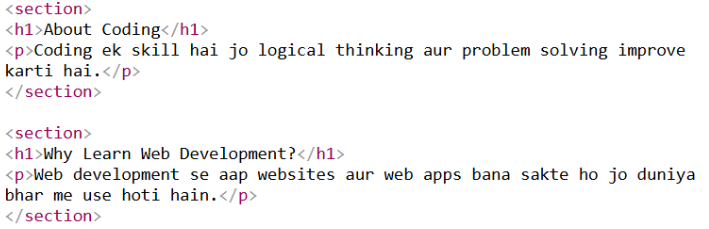
HTML <section> Element
<section> element document ke andar ek section define karta hai.
Section usually thematic grouping hota hai jiske saath heading hoti hai.
<section> use ho sakta hai:
-
Chapters
-
Introduction
-
News items
-
Contact information
Example:
HTML <article> Element
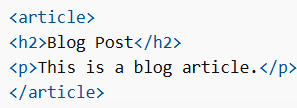
<article> element independent aur self-contained content define karta hai.
Article aisa content hota hai jo apne aap me meaningful ho aur alag se share bhi ho sake.
<article> use ho sakta hai:
-
Blog posts
-
Forum posts
-
User comments
-
Product cards
-
News articles
Example:
Nesting <article> aur <section>
Semantic Elements in HTML ko ek dusre ke andar bhi use kiya ja sakta hai.
-
<article>independent content define karta hai -
<section>document ka ek part define karta hai
Kabhi <section> ke andar <article> hota hai, aur kabhi <article> ke andar <section>.
HTML <header> Element
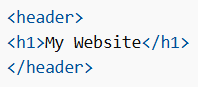
<header> introductory content ya navigation links ka container hota hai.
Usually <header> ke andar hota hai:
-
Headings (
<h1> - <h6>) -
Logo ya icon
-
Author information
Ek document me multiple <header> elements ho sakte hain.
Lekin <header> ko <footer>, <address> ya dusre <header> ke andar nahi rakhna chahiye.
Example:
HTML <footer> Element
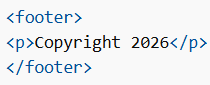
<footer> document ya section ka footer define karta hai.
Usually <footer> me hota hai:
-
Author information
-
Copyright information
-
Contact details
-
Related links
Ek document me multiple <footer> elements ho sakte hain.
Example:
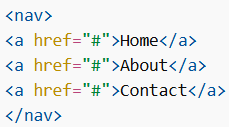
HTML <nav> Element
<nav> navigation links ka group define karta hai.
Har link ko <nav> ke andar nahi rakhna chahiye. Yeh sirf major navigation links ke liye use hota hai.
Example:
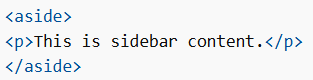
HTML <aside> Element
<aside> main content ke side ka content define karta hai, jaise sidebar.
Yeh content surrounding content se indirectly related hota hai.
Example:
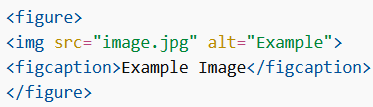
HTML <figure> aur <figcaption> Elements
<figure> self-contained content define karta hai jaise:
-
Image
-
Diagram
-
Code listing
<figcaption> <figure> ke liye caption define karta hai.
Example:
Is tarah Semantic Elements in HTML web pages ko structured, meaningful aur easy to understand banate hain. Developers semantic elements ka use karke better readability, accessibility aur SEO friendly websites create kar sakte hain.
