
Links almost har web page me hote hain. Links in HTML users ko ek page se dusre page pe jump karne dete hain.
HTML Links – Hyperlinks
Links in HTML ko hyperlinks kehte hain. Link pe click karte hi dusra document open ho jata hai. Mouse link ke upar le jaoge to arrow chhota sa hand ban jata hai.
Links in HTML sirf text nahi hota, image ya koi bhi HTML element link ban sakta hai.
Syntax:

- <a> tag hyperlink define karta hai.
- href attribute batata hai link kahan jayega.
- Jo text <a> ke andar hota hai wahi visible hota hai.
Example:
<a href “https://www.example.com/“> Visit Examples! </a>
Default Link Colors
- Unvisited → Blue + Underlined
- Visited → Purple + Underlined
- Active → Red + Underlined
CSS se inka look change kar sakte ho.
target Attribute
Link kahan open hoga, ye target decide karta hai:
- _self → Same tab (default)
- _blank → New tab/window
- _parent → Parent frame
- _top → Full window
Example:
<a href “https://www.example.com/” target=”_blank”> Visit Examples! </a>
Absolute vs Relative URL
- Absolute URL → Full web address

- Relative URL → Same website ke andar ka link

Image as Link
<img> ke saath <a> use kar sakte ho.
Example:

Email Link
Aap mailto: ke andar href attribute use kar sakte ho.
Example:
<a href=”mailto:someone@example.com“>Send email</a>
Button as Link (JavaScript use hota hai)
Example:

Title Attribute (Tooltip)
<a href=”https://www.example.com/html/” title=”Go to HTML example section”>
Visit our example HTML Tutorial
</a>
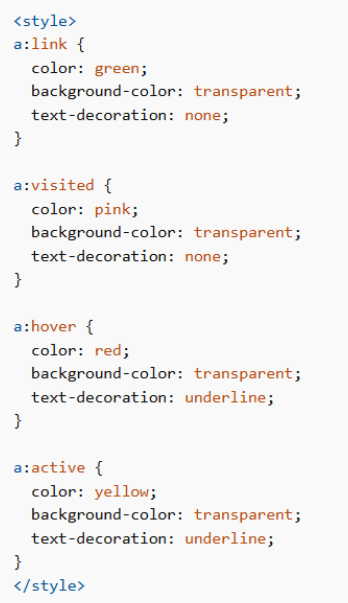
HTML Links Different Colors
HTML link ka color change hota hai depending on uska state, visited hai ya nahi, ya click ho raha hai.
CSS se Link Colors Change Karna
Aap CSS use karke link ke alag-alag states ka color change kar sakte ho:
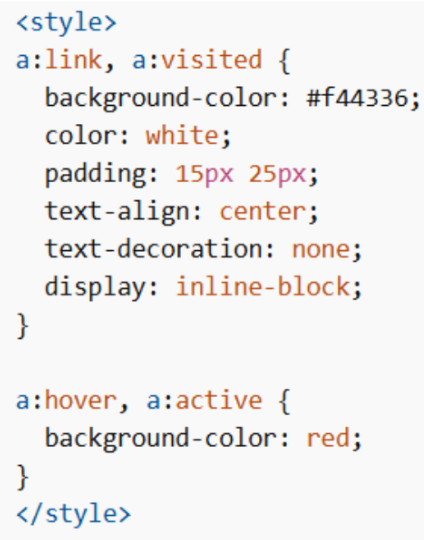
Link Button
CSS se link ko proper button look bhi de sakte ho.
Example:
HTML Link Bookmarks
HTML links se tum bookmarks bana sakte ho, jisse user page ke kisi specific part pe directly jump kar sake. Ye especially useful hota hai jab page bahut lamba ho.
Step 1: Bookmark Create karo
Bookmark banane ke liye id attribute use karte hain.

Yaha “C4” bookmark ka naam hai.
Step 2: Bookmark ka Link Add karo (Same Page)

#C4 ka matlab hai page ke andar jis element ka id “C4” hai, waha jump karo. Click karte hi page scroll hoke directly Chapter 4 pe chala jayega
Agar bookmark kisi aur page pe hai:

Ye pehle html_demo.html open karega, fir waha ke “C4” id pe jump karega.
