
Padding in CSS ka use element ke content ke around space create karne ke liye hota hai, jo border ke andar hota hai. Ye content aur border ke beech ka gap define karta hai.
CSS me tum padding ko fully control kar sakte ho — har side ke liye alag ya ek hi line me sab set kar sakte ho.
Padding – Individual Sides
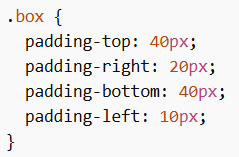
Padding in CSS me har side ke liye alag properties hoti hain:
- padding-top → upar ka space
- padding-right → right side ka space
- padding-bottom → neeche ka space
- padding-left → left side ka space
Example:
Padding Values
All padding properties ye values le sakti hain:
- length → px, pt, cm, etc.
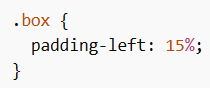
- % → parent element ke width ke according
- inherit → parent se value le lega
Important Note: Negative values allowed nahi hain.
Example:
Padding – Shorthand Property
Code short karne ke liye sab padding ek line me likh sakte ho.
Includes:
- padding-top
- padding-right
- padding-bottom
- padding-left
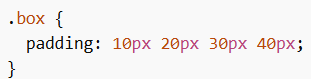
Four Values
Order: top, right, bottom, left
Example:
Three Values
Order: top, (right & left), bottom
Example:
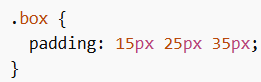
Two Values
Order: (top & bottom), (right & left)
Example:
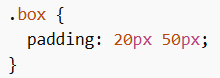
One Value
Sab sides ke liye same padding
Example:
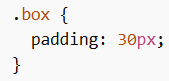
Padding and Element Width
Padding in CSS ka effect element ke total width par bhi padta hai.
Agar tum width set karte ho, to padding usme add ho jata hai.
Example:
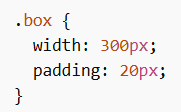
Actual width = 300px + left padding + right padding
= 340px
Padding and box-sizing
box-sizing property decide karti hai ki width aur height ka calculation kaise hoga.
Values:
- content-box → default, sirf content count hota hai (padding + border extra add hota hai)
- border-box → content + padding + border sab include hota hai
Using border-box
Agar tum chahte ho ki width fix rahe chahe padding badhe, to border-box use karo.
Example:
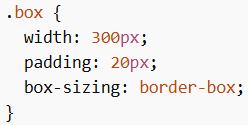
Ab total width 300px hi rahegi, padding andar adjust ho jayega.
Padding in CSS content aur border ke beech space control karne ke liye use hota hai. Shorthand, individual sides aur box-sizing jaise concepts use karke tum layout ko clean aur properly spaced bana sakte ho.
