
How to CSS ka matlab hai HTML page me CSS ko add karna taaki hum design aur styling control kar sakein.
Jab browser CSS file ko read karta hai, to wo HTML elements ko uske according style kar deta hai.
CSS add karne ke 3 main tarike hote hain:
-
External CSS
-
Internal CSS
-
Inline CSS
1. External CSS
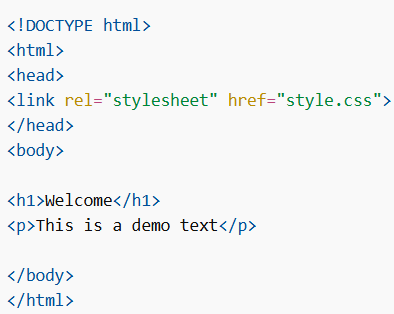
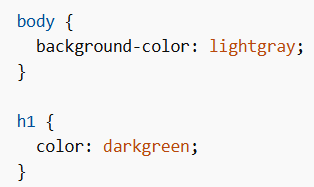
External CSS me styling ek alag .css file me likhi jati hai.
Iska fayda:
Ek hi file change karke poori website ka design change kar sakte ho.
HTML File Example
CSS File (style.css)
Important:
-
CSS file ka extension
.csshona chahiye -
CSS file ke andar HTML tags nahi hote
-
20pxlikhte hain,20 pxnahi
2. Internal CSS
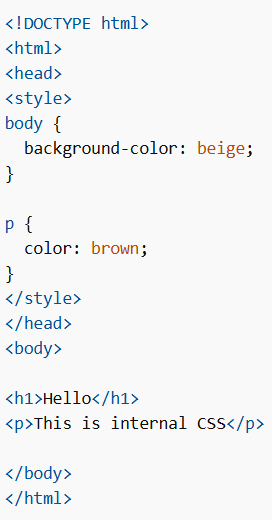
Internal CSS tab use hota hai jab sirf ek page ko style karna ho
Ye <style> tag ke andar likha jata hai (head section me)
Example
3. Inline CSS
Inline CSS ek single element ko style karne ke liye use hota hai.
Ye direct HTML tag ke andar style attribute se likha jata hai.
Example

Multiple CSS & Priority (Cascading)
Agar ek hi element par multiple CSS apply ho rahi ho, to ek rule follow hota hai.
Example
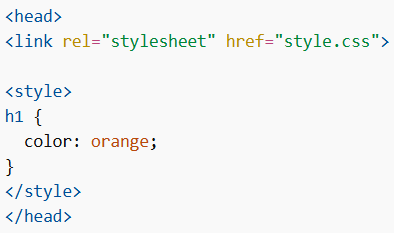
Agar external file me:
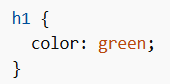
To final color hoga orange
kyunki internal CSS baad me likhi hai.
Cascading Order (Priority)
CSS me priority is order me hoti hai:
-
Inline CSS (highest priority)
-
Internal CSS
-
External CSS
-
Browser default (lowest)
