
Margins in CSS ka use elements ke around space create karne ke liye hota hai, jo border ke bahar hota hai. Ye element aur uske surrounding elements ke beech distance define karta hai.
CSS me tumhe full control milta hai margins pe, tum har side ka margin alag set kar sakte ho ya ek hi line me sab set kar sakte ho.
Margin – Individual Sides
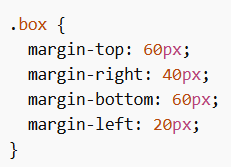
Margins in CSS me har side ke liye alag properties hoti hain:
- margin-top → upar ka space
- margin-right → right side ka space
- margin-bottom → neeche ka space
- margin-left → left side ka space
Example:
Margin Values
All margin properties ye values le sakti hain:
- auto → browser automatically calculate karta hai
- length → px, cm, etc. (fixed value)
- % → parent element ke width ke according
- inherit → parent se value le lega
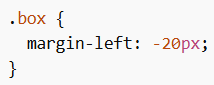
Note: Negative values bhi allowed hain.
Example:
Margin – Shorthand Property
Code short karne ke liye sab margins ek line me likh sakte ho.
Includes:
- margin-top
- margin-right
- margin-bottom
- margin-left
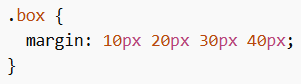
Four Values
Order: top, right, bottom, left
Example:
Three Values
Order: top, (right & left), bottom
Example:
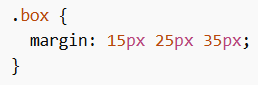
Two Values
Order: (top & bottom), (right & left)
Example:
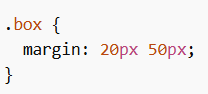
One Value
Sab sides ke liye same margin
Example:
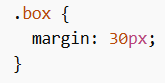
Auto Value
Margins in CSS me auto use karke element ko horizontally center kar sakte ho.
Example:
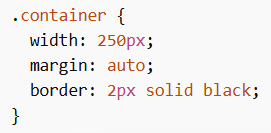
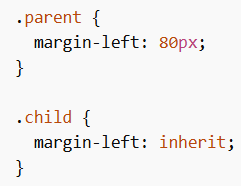
Inherit Value
inherit se margin parent element se copy hota hai.
Example:
Margin Collapse
Margins in CSS me ek important concept hai: margin collapse
Jab do vertical margins (top aur bottom) milte hain, to wo add nahi hote — balki ek hi margin ban jata hai jo bada wala hota hai.
Important Note:
- Sirf top aur bottom margins collapse hote hain
- Left aur right margins collapse nahi hote
Example 1
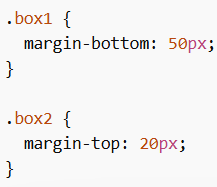
Expected: 70px
Actual: 50px (bada value apply hota hai)
Example 2
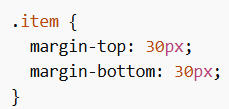
Expected: 60px
Actual: 30px
Margins in CSS layout me spacing control karne ke liye bahut important hain. Tum individual sides, shorthand, auto centering aur margin collapse jaise concepts use karke clean aur properly spaced design bana sakte ho.
