
Agar tum apni website ko thoda fancy + modern + aesthetic banana chahte ho, then icons in CSS are your best friend. Icons basically small graphics hote hain jo buttons, menus, UI ko clean aur attractive banate hain.
Table of Contents
ToggleHow To Add Icons in CSS
Icons ko HTML me add karna kaafi easy hota hai:
Tum bas kisi bhi inline element jaise <i> ya <span> ke andar icon class use karte ho
Example:

Important:
- Icons vector based hote hain → matlab size badhao ya chhota karo, quality same rehti hai
- Tum CSS se easily color, size, shadow, spacing change kar sakte ho
Font Awesome Icons
Font Awesome ek bohot famous icon library hai.
Kaise use karein:
Step 1: <head> me script add karo

Iske liye tumhe fontawesome.com se code lena padta hai
Koi download nahi karna hota (direct CDN se load hota hai)
Example:
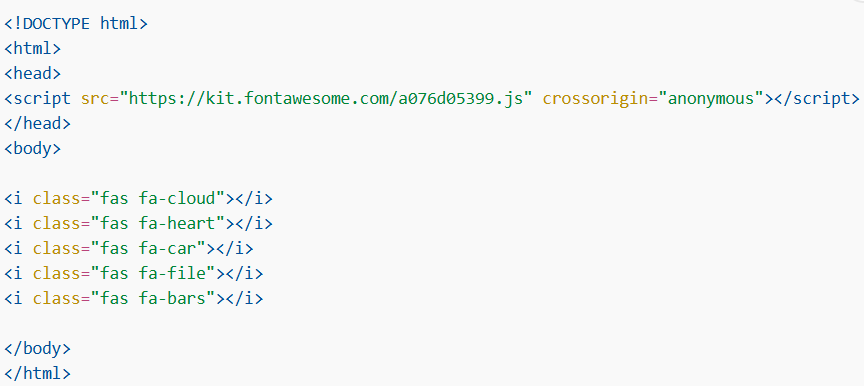
Ye icons show karega:
- cloud ☁️
- heart ❤️
- car 🚗
- file 📄
- menu bars ☰
Bootstrap Icons (Glyphicons)
Bootstrap bhi icons provide karta hai (especially older versions me glyphicons).
Kaise use karein:
Step 1: <head> me CSS link add karo

Again, no download needed
Example:
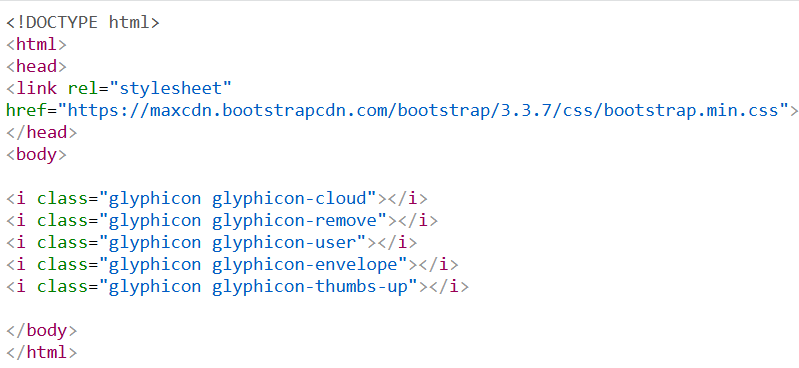
Icons:
- cloud
- remove (❌)
- user 👤
- email ✉️
- thumbs up 👍
Google Icons (Material Icons)
Google ke icons clean aur modern hote hain → UI/UX ke liye best.
Kaise use karein:
Step 1: <head> me link add karo

Example:
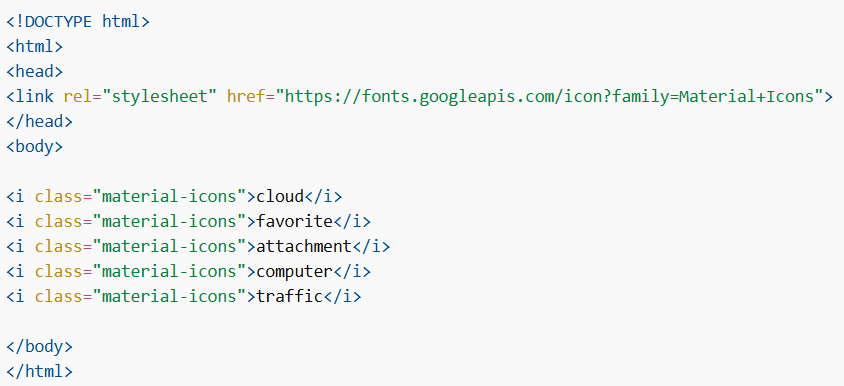
Icons:
- cloud ☁️
- favorite ❤️
- attachment 📎
- computer 💻
- traffic 🚦
Icons in CSS ek powerful feature hai jo website ko visually attractive banata hai.
Tum Font Awesome, Bootstrap aur Google Icons jaise libraries use karke easily icons add kar sakte ho without any installation.
