
Links in CSS ka use karke tum HTML links ko stylish aur interactive bana sakte ho. Normally links simple blue aur underlined hote hain, but CSS se tum unhe fully customize kar sakte ho.
Table of Contents
ToggleCSS Styling Links
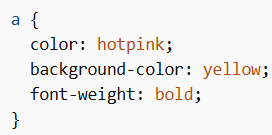
HTML links ko tum multiple CSS properties se style kar sakte ho:
- color
- text-decoration
- background-color
- font-size
- font-weight
- font-family
Example:
Styling Links Based on State
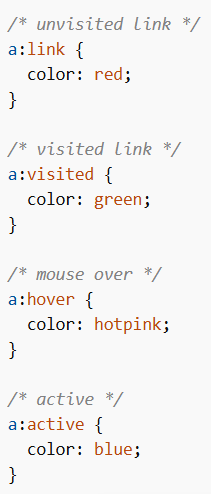
Links ke different states hote hain, aur tum unhe alag-alag style kar sakte ho.
4 Link States:
:link→ normal (unvisited link):visited→ already visited link:hover→ jab mouse link ke upar aaye:active→ jab link click ho raha ho
Important Order Rule:
:hover→ hamesha:linkaur:visitedke baad likhna hai:active→ hamesha:hoverke baad likhna hai
Example:
Links in CSS – Text Decoration
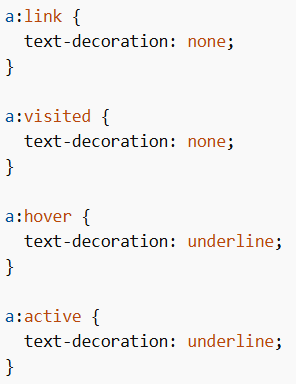
text-decoration property mainly underline remove ya add karne ke liye use hoti hai.
Example:
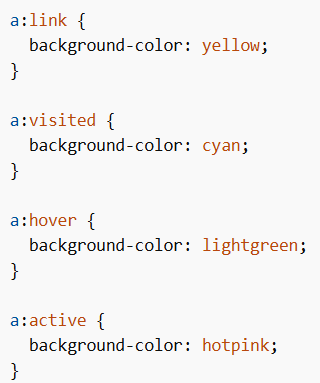
Links in CSS – Background Color
Links ka background color bhi change kar sakte ho.
Example:
CSS Link Buttons
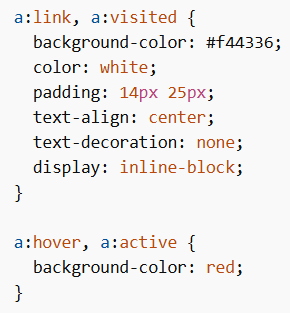
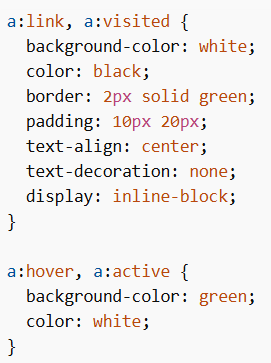
CSS ka use karke tum normal links ko button jaisa design de sakte ho.
Example 1: Simple Button Style
Example 2: Border Button Style
Important Points
- Links ko different states ke according style kar sakte ho
- Order follow karna important hai (
link → visited → hover → active) text-decorationse underline control hota haibackground-colorse links highlight hote hain- CSS se links ko button me convert kar sakte ho
Links in CSS web design ka important part hai jo user interaction aur navigation ko improve karta hai. CSS properties aur link states ka proper use karke tum attractive aur user-friendly links bana sakte ho.
Proper styling se:
- User experience better hota hai
- Website interactive lagti hai
- Navigation easy ho jata hai
