Accessibility Styling in CSS ka matlab hai website ko aise design karna jo sab users ke liye accessible ho, including disabilities wale users.
Iska main goal hai better visual clarity, navigation aur overall user experience.
Accessibility Styling in CSS Technics
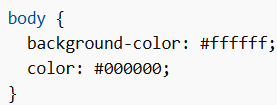
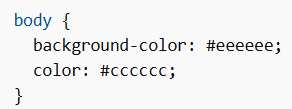
1. Provide High Color Contrast
Text aur background ke beech strong contrast use karo taaki readability achhi ho, especially visually impaired users ke liye.
Good Color Contrast
Bad Color Contrast
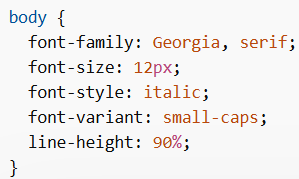
2. Provide Good Font, Font Size and Line Height
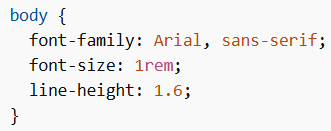
Readable font use karo, proper font-size aur line-height maintain karo.
Font-size ke liye relative units (jaise rem) use karo taaki user browser settings se text scale kar sake.
Good Font Example
Bad Font Example
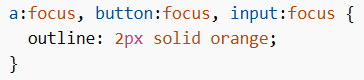
3. Have Visible Focus Indicators
Interactive elements (links, buttons, input fields) ke liye visible focus style zaruri hai.
Ye keyboard users aur screen readers ke liye helpful hota hai.
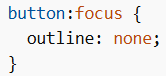
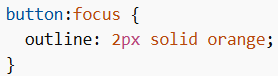
4. Avoid Hiding Focus
Default focus outline ko remove mat karo bina replacement ke.
Bad Example
Good Example
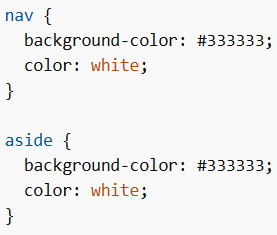
5. Use CSS + Semantic HTML
Styling ke liye CSS use karo aur structure ke liye semantic HTML elements use karo (jaise nav, aside).
6. Respect User Preferences
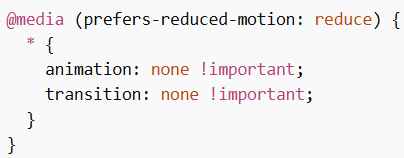
Kuch users ko animations se problem hoti hai (motion sensitivity).
CSS me prefers-reduced-motion use karke animations ko disable ya reduce kar sakte ho.
Summary
Accessibility Styling in CSS better usability ke liye important hai.
- High color contrast use karo
- Readable fonts use karo
- Focus indicators visible rakho
- Semantic HTML use karo
- User preferences respect karo