
Image Sprites in CSS ek technique hai jisme multiple chhoti images ko ek hi badi image file me combine kiya jata hai, jise sprite image kehte hain.
Yeh sprite image usually grid format me arranged hoti hai.
Table of Contents
ToggleImage Sprites in CSS ka use kyun hota hai
Agar ek web page me bahut saari images ho:
- Page load slow ho jata hai
- Multiple server requests generate hote hain
Isliye Image Sprites in CSS use karke:
- Sirf ek hi image download hoti hai
- Server requests kam ho jate hain
- Bandwidth usage reduce hota hai
CSS Image Sprites Example
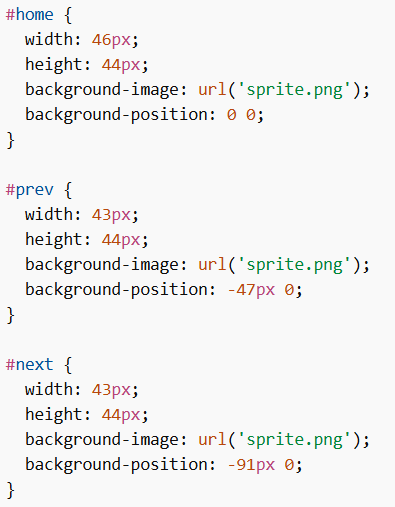
Image Sprites in CSS me mainly 2 properties use hoti hain:
background-imagebackground-position
Example
Example Explained
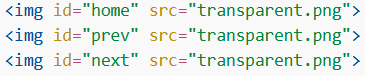
widthaurheight→ har image part ka size define karta haibackground-image→ sprite image ka path set karta haibackground-position→ image ko shift karke specific part show karta hai<img>me transparent image use hoti hai kyunkisrcempty nahi ho sakta- Actual visible image CSS ke through background se aati hai
Image Sprites in CSS with Navigation List
Image Sprites in CSS ko navigation menu me bhi use kar sakte hain using <ul> and <li>.
Example
Example Explained
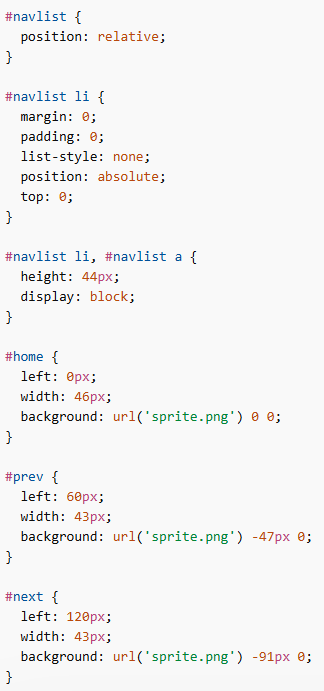
#navlist { position: relative; }→ andar ke elements ko position karne ke liyeli→ margin/padding remove + bullets remove + absolute positioningdisplay: block→ elements ko proper size aur clickable area deta hai
Positioning:
#home→ left: 0px, width: 46px#prev→ left: 60px (home ke baad thoda gap)#next→ left: 120px (prev ke baad position)
Background positioning:
0 0→ first image show karta hai-47px 0→ next part show karta hai-91px 0→ next part show karta hai
Image Sprites in CSS ek efficient technique hai jisme multiple images ko ek single image me combine karke use kiya jata hai. Yeh performance improve karta hai by reducing server requests aur faster page loading provide karta hai, especially navigation icons aur UI elements ke liye.
