
Counters in CSS ek powerful feature hai jisse tum bina JavaScript use kiye automatic numbering create kar sakte ho (jaise headings, sections, list items, etc.).
CSS Counters basically variables ki tarah kaam karte hai jinka value CSS rules ke through increase ya decrease hota hai.
CSS Counters kaise kaam karte hai?
Counters in CSS use karne ke liye kuch important properties hoti hai:
- counter-reset → Counter create ya reset karta hai
- counter-increment → Counter value ko increase ya decrease karta hai
- content → Generated content insert karta hai
- counter() → Counter ki current value show karta hai
Counters in CSS ka simple use
Sabse pehle counter ko create karna padta hai using counter-reset.
Phir jis element pe numbering chahiye usme counter-increment use karte hai.
Example:
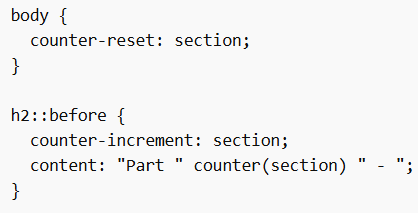
Isse har h2 ke pehle automatic numbering aa jayegi:
Part 1
Part 2
Part 3
Counter ko decrease kaise kare
By default counter +1 se increase hota hai, but tum ise decrease bhi kar sakte ho.
Example:
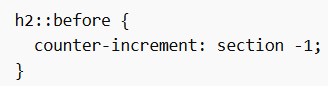
Isse numbering reverse direction me jayegi.
Custom increment value
Tum apni marzi ka number se increment kar sakte ho (sirf +1 hi nahi).
Example:
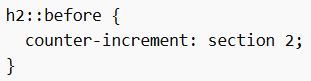
Isme numbering hogi:
Part 2 → Part 4 → Part 6
Nested Counters in CSS (Multiple Levels)
Counters in CSS me tum multiple counters bhi use kar sakte ho for different levels (jaise section + subsection numbering).
Isse tum numbering bana sakte ho like:
1.1, 1.2, 2.1, etc.
Example:
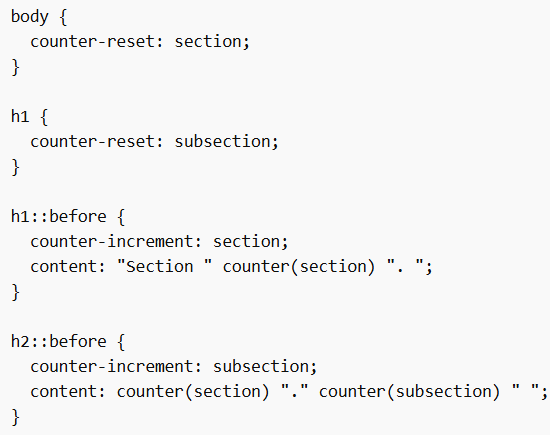
Yaha kya ho raha hai:
- h1 → main section number increase karega
- h2 → subsection number increase karega
- Output → Section 1, 1.1, 1.2, Section 2, 2.1, etc.
Counters in CSS ek smart aur clean way hai automatic numbering ke liye, especially jab tumko headings, sections, ya multi-level numbering (like 1.1, 1.2) banana ho bina extra HTML ya JavaScript likhe.
