
HTML SVG Graphics
SVG in HTML web pages me scalable vector graphics create karne ke liye use kiye jaate hain. SVG in HTML ek vector-based graphics format hai jo XML me define hota hai aur directly HTML pages me embed kiya ja sakta hai. SVG graphics scalable hote hain, matlab agar zoom ya resize karo to quality bilkul lose nahi hoti. SVG sabhi major browsers me supported hai.
What is SVG?
- SVG ka full form hai Scalable Vector Graphics
- SVG web ke liye vector-based graphics define karne ke liye use hota hai
- SVG graphics XML format me define hote hain
- SVG file ka har element aur attribute animate kiya ja sakta hai
- SVG CSS, DOM, XSL aur JavaScript jaise standards ke saath integrate hota hai
The <svg> Element
HTML <svg> element SVG graphics ke liye ek container hota hai. SVG in HTML me alag-alag shapes draw karne ke methods hote hain jaise:
- paths
- rectangles
- circles
- polygons
- text
- aur bhi bahut kuch
Examples:
Ab hum SVG in HTML ke kuch basic examples dekhenge.
1. SVG Circle
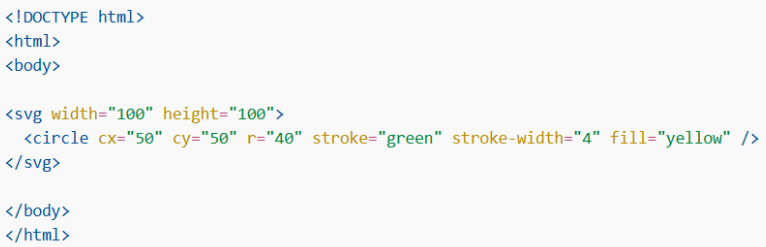
Yeh code ek circle draw karta hai.
- cx = circle ka center x position
- cy = circle ka center y position
- r = radius
- stroke = border color
- fill = inside color
2. SVG Rectangle

Yeh code ek rectangle draw karta hai.
- x, y = starting position
- width, height = size
- stroke = border color
- fill = inside color
3. SVG Rectangle with Opacity and Rounded Corners

Yeh rectangle me:
- rx aur ry = rounded corners
- opacity = transparency level
Comparison of SVG and Canvas
|
Feature |
SVG |
Canvas |
| Type | XML-based language for 2D graphics | JavaScript se 2D graphics draw karta hai |
| Rendering | Object-based (har shape ek object hota hai) | Pixel-based (pixel by pixel draw hota hai) |
| Resolution | Resolution independent (zoom karne par quality same rehti hai) | Resolution dependent (zoom karne par blur ho sakta hai) |
| Event Handlers | Supported (click, hover etc directly laga sakte ho) | Direct support nahi hota |
| DOM Access | Har element DOM ka part hota hai | DOM me individual shapes available nahi hote |
| Re-rendering | Attribute change karo to browser automatically update karta hai | Position change karne par pura canvas dobara draw karna padta hai |
| Text Rendering | Text clear aur sharp hota hai | Text rendering weak hoti hai |
| Performance | Complex graphics me slow ho sakta hai | Fast for complex animations |
| Best Use | Icons, charts, logos, simple graphics | Games, animations, real-time graphics |
| Image Export | Direct image export nahi | Result ko .png ya .jpg me save kar sakte ho |
