Pagination in CSS ka use hota hai content ko multiple pages me divide karne ke liye aur un pages ke links dikhane ke liye.
Isse user easily ek page se dusre page pe jaa sakta hai.
Example:
« 1 2 3 4 5 »
Basic Structure of Pagination in CSS
Pagination usually banti hai:
<ul>→ container<li>→ har page number<a>→ clickable link
Example: Simple Pagination
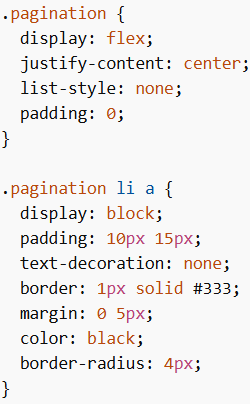
Explanation:
display: flex→ sab items ek line me aate hainjustify-content: center→ center me align karta hailist-style: none→ bullets hata deta hai<a>styling → buttons jaisa look deta hai
Active Page
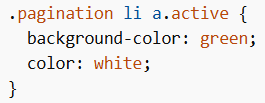
Explanation:
- Current page ko highlight karta hai
- User ko pata chalta hai wo kis page pe hai
Disabled Button
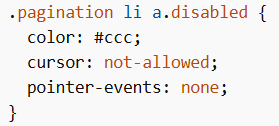
Explanation:
- Jab Next/Previous clickable nahi hota tab use hota hai
pointer-events: noneclick disable kar deta hai
Hover Effect
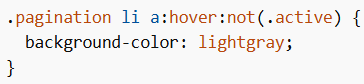
Explanation:
- Mouse le jane pe color change hota hai
- Active page pe effect apply nahi hota
Transition Effect
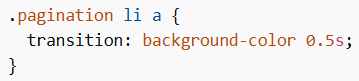
Explanation:
- Smooth animation deta hai hover ke time
Breadcrumb Pagination
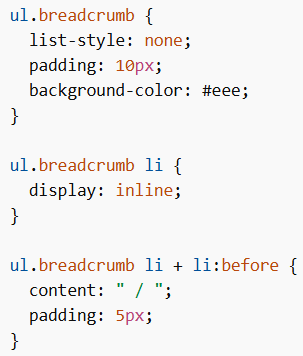
Explanation:
- Path dikhata hai (like navigation)
- Example: Home / Products / Shoes
Points to Remember
- Pagination in CSS navigation ko easy banata hai
<ul>,<li>,<a>ka use hota hai- Flexbox se layout simple ho jata hai
.activecurrent page highlight karta hai.disabledbutton disable karta hai- Hover aur transition UI improve karte hain
Pagination in CSS ka use large content ko pages me divide karne aur user ko easily navigate karne ke liye hota hai. Isme list structure use hota hai aur CSS se styling, hover effects aur active states apply kiye jate hain.