Masking in CSS is used to control the visibility of parts of an element. A mask layer is applied over an element to hide or show specific areas.
Simple idea:
- Black area → hidden
- Transparent area → visible
Key Property of Masking in CSS
- mask-image → defines the mask layer
- It can use:
- PNG images
- SVG
- CSS gradients
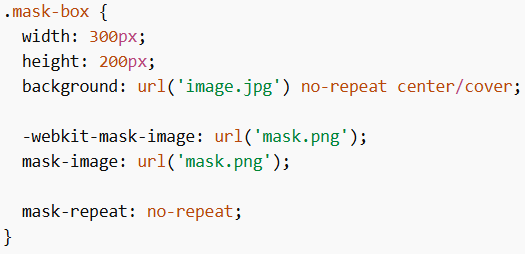
Example 1: Using Image as Mask
Explanation:
mask-image→ sets the maskmask-repeat→ prevents repeating- Only selected part of image will be visible
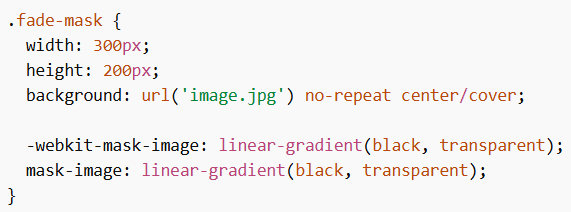
Example 2: Gradient Mask
Explanation:
- Creates a fading effect
- Top part visible, bottom part fades
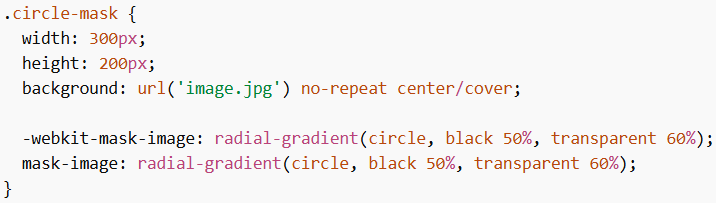
Example 3: Circular Mask
Explanation:
- Shows only circular portion of image
- Rest is hidden
Positioning the Mask
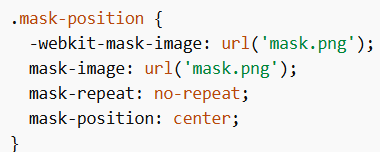
Explanation:
mask-position→ controls placement of mask- Can use values like center, left, right
SVG Mask (Advanced)
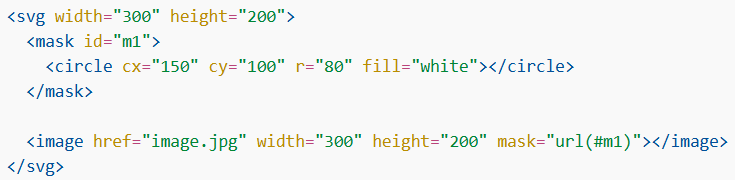
Explanation:
- SVG allows custom shapes
- Can create circle, star, triangle masks
Points to Remember
- Masking in CSS controls visibility of elements
mask-imageis the main property- Black hides, transparent shows
- Gradients create smooth effects
- SVG allows complex shapes
Masking in CSS is used to hide or show parts of elements using mask layers. It works with images, gradients, and SVG shapes. It is useful for creating advanced UI effects and visual designs.