<form> ke andar alag-alag elements hote hain jo user se data lene ke liye use hote hain.
Form elements in HTML iss prakar hai:
<input>
<label>
<select>
<option>
<optgroup>
<textarea>
<button>
<fieldset>
<legend>
<datalist>
<output>
Aab ham ek ek karke sare form elements in HTML discuss karenge.
<input> Element
Sabse common element. User se input lene ke liye. Type change karoge to behaviour change ho jayega (text, radio, checkbox, etc.)
Example:

<label> Element
Input ka naam/description deta hai.
Benefits:
- Screen readers ke liye helpful
- Text pe click karne se radio/checkbox select ho jata hai
- for = input ka id
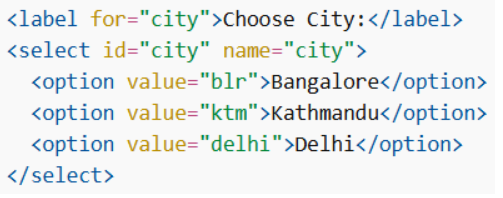
<select> Element
Dropdown banane ke liye use hota hai. Default first option selected hota hai.
Example:
Pre-selected option:
Pehle se hi select kar sakte ho

Size Attribute
Kitne options visible honge

Multiple Selection
User ek se zyada select kar sakta hai

<textarea> Element
Multi-line input ke liye (paragraph type text).
- rows = height
- cols = width
Example:

<button> Element
Clickable button banata hai. Always type likho (button, submit, reset).
Example:

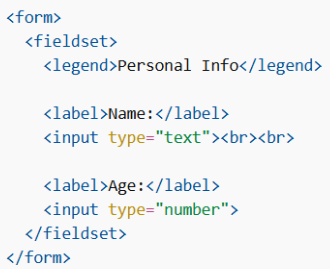
<fieldset> and <legend>
Related fields ko group karta hai. Automatically border draw karta hai. legend title deta hai box ko.
Example:
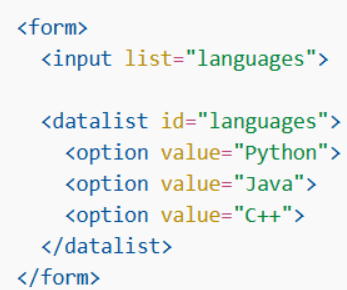
<datalist> Element
Input ke liye suggestion list deta hai.
Example:
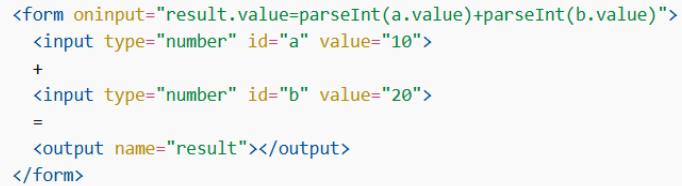
<output> Element
Calculation ka result show karta hai.
Example: