

Block and Inline Elements in HTML web page ke layout ko samajhne ke liye bahut important concept hai. Har HTML element ka ek default display value hota hai jo element ke type par depend karta hai. Do sabse common display types block aur inline hote hain.
Table of Contents
ToggleBlock-level Elements
Block and Inline Elements in HTML me block-level elements hamesha nayi line se start hote hain.
Features:
-
Hamesha new line se start hote hain
-
Browser automatically before aur after space (margin) add karta hai
-
Element poori available width le leta hai (left se right tak)
Do commonly used block-level elements:
-
<p>→ paragraph define karta hai -
<div>→ division ya section define karta hai
Example:
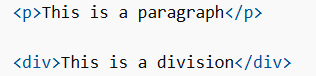
Yahaan <p> aur <div> dono block-level elements hain.
Common Block-level Elements
Block and Inline Elements in HTML me kuch common block elements yeh hain:
<dd> <div> <dl> <dt> <fieldset> <figcaption>
<figure> <footer> <form> <h1> – <h6>
<header> <hr> <li> <main> <nav>
<noscript> <ol> <p> <pre> <section>
<table> <tfoot> <ul> <video>
Yeh sab elements nayi line se start hote hain aur full width lete hain.
Inline Elements
Block and Inline Elements in HTML me inline elements nayi line se start nahi hote.
Features:
-
Same line me display hote hain
-
Sirf utni width lete hain jitni zaroori ho
-
Mostly text ke andar use hote hain
Example:

Yahaan <span> element inline element hai jo paragraph ke andar use hua hai.
The <div> Element
Block and Inline Elements in HTML me <div> element ek block-level container hota hai.
Use:
-
Dusre HTML elements ko group karne ke liye
-
Web page me sections create karne ke liye
Important points:
-
<div>ka koi required attribute nahi hota -
Common attributes:
style,class,id
Example:
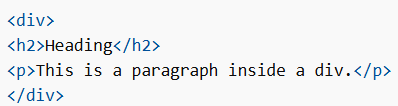
CSS ke saath <div> ka use content blocks ko style karne ke liye kiya jata hai.
The <span> Element
Block and Inline Elements in HTML me <span> element ek inline container hota hai.
Use:
-
Text ke chhote parts ko mark ya style karne ke liye
-
Mostly CSS ke saath use hota hai
Important points:
-
<span>ka koi required attribute nahi hota -
Common attributes:
style,class,id
Example:

Yahaan <span> sirf text ke ek part ko style kar raha hai.
Is tarah Block and Inline Elements in HTML web page ke layout ko control karne me help karte hain, jahan block elements full width ke saath new line par display hote hain aur inline elements sirf required space lekar same line me show hote hain.
