
Style Guide for HTML developers ko clean, consistent aur readable HTML code likhne me help karta hai. Ek proper Style Guide for HTML follow karne se code ko samajhna aur maintain karna easy ho jata hai.
Important Points in Style Guide for HTML
Neeche diye gaye rules Style Guide for HTML ke important best practices hain jo developers ko clean aur organized HTML code likhne me help karte hain.
1. DOCTYPE Declaration
Hamesha document ki first line me <!DOCTYPE html> declare karo.
Example:
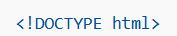
Yeh browser ko batata hai ki document HTML5 format me likha gaya hai.
2. Lowercase Element Names
HTML element names hamesha lowercase me likho.
Correct:
Incorrect:
3. Lowercase Attribute Names
Attribute names bhi lowercase me hone chahiye.
Example:

4. Close All HTML Elements
Sabhi HTML elements ko properly close karna chahiye.
Example:
5. Attribute Values in Quotes
Attribute values ko hamesha double quotes (” “) me likhna chahiye.
Example:

6. Image Attributes
Images me alt, width aur height attributes specify karna best practice hai.
Example:

7. Avoid Unnecessary Spaces
Equal sign (=) ke around extra spaces avoid karo.
Correct:
Incorrect:
8. Avoid Very Long Code Lines
Bahut lambi code lines avoid karo taaki code readable rahe.
9. Use Blank Lines
Logical blocks ke beech blank line dene se code readable ho jata hai.
Example:
<h1>My Website</h1>
</header><section>
<p>Welcome to my website.</p>
</section>
10. Use Proper Indentation
Indentation ke liye 2 spaces use karo aur tab key avoid karo.
Example:
<li>Item 1</li>
<li>Item 2</li>
</ul>
11. Always Include <title>
<title> element kabhi skip mat karo. Yeh SEO aur browser tab title ke liye important hota hai.
Example:
12. Include Basic Structure
Har HTML document me <html>, <head> aur <body> tags include hone chahiye.
Example:
<head>
<title>Example</title>
</head>
Content here
</body>
13. Empty Elements
Empty elements ko close karna optional hai.
Example:

ya

Bas same style consistently use karo.
14. Add Language Attribute
<html> tag me lang attribute add karna chahiye.
Example:
15. Character Encoding
Document ke start me character encoding define karo.
Example:
16. Viewport for Responsive Design
Responsive design ke liye viewport meta tag add karo.
Example:

17. Comments
-
Short comments ek line me likho
-
Long comments properly format aur indent karo
Example:

18. Linking CSS
CSS file ko simple syntax se link karo.
Example:

19. Writing CSS Rules
Short CSS rules ek line me likh sakte ho, lekin long rules multi-line me likho.
Example:
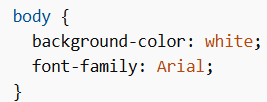
Opening bracket same line me rakho aur har property ke baad semicolon lagao.
20. Loading JavaScript
JavaScript file ko simple syntax se load karo.
Example:

JavaScript me IDs case-sensitive hote hain, isliye naming consistent rakho.
21. File Naming
-
File names hamesha lowercase me rakho
-
HTML files .html ya .htm extension use karti hain
-
CSS files .css extension use karti hain
-
JavaScript files .js extension use karti hain
.html aur .htm me koi functional difference nahi hota.
22. Default File
Agar URL me filename specify nahi hota, to server default file load karta hai jaise:
-
index.html -
default.html
Is tarah Style Guide for HTML follow karne se code clean, readable aur maintainable ban jata hai. Har developer ko better web development ke liye Style Guide for HTML practices follow karni chahiye.
