
What is CSS in HTML?
Cascading Style Sheets (CSS) webpage ke layout ko format karne ke liye use hota hai.
Through CSS in HTML aap text ka color, font, size, elements ke beech ka spacing, elements ki position aur layout, background images ya background colors, aur different devices aur screen sizes ke liye display control kar sakte ho.
Using CSS
CSS in HTML ko 3 tariko se add kiya ja sakta hai:
- Inline – HTML element ke andar style attribute use karke
- Internal – <head> section ke andar <style> element use karke
- External – <link> element se external CSS file connect karke
Sabse common method external CSS hai. Lekin yaha inline aur internal use kiya ja raha hai kyunki yeh samajhne aur try karne me easy hai.
Inline CSS
Inline CSS ek single HTML element par unique style lagane ke liye use hota hai. Isme element ke style attribute ka use hota hai.
Example:

Internal CSS
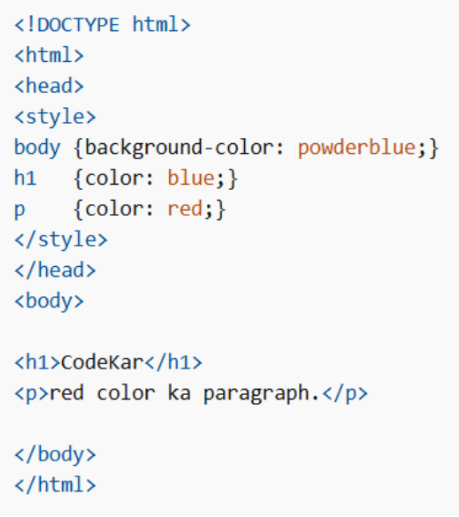
Internal CSS ek single HTML page ke liye style define karta hai. Yeh <head> section ke andar <style> element me likha jata hai.
Example:
External CSS
External style sheet multiple HTML pages ke liye style define karta hai. Isko use karne ke liye <head> section me link add karte hain:

External CSS file me koi HTML code nahi hota, sirf CSS hota hai, aur file .css extension se save hoti hai.
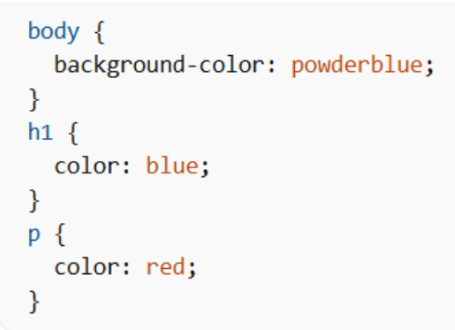
Example styles.css:
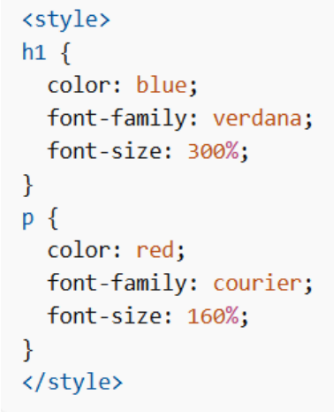
- color property text ka color set karti hai
- font-family font set karta hai
- font-size text ka size set karta hai
Example:
CSS Border
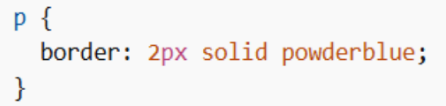
border property HTML element ke around border define karti hai.
Example:
CSS Padding
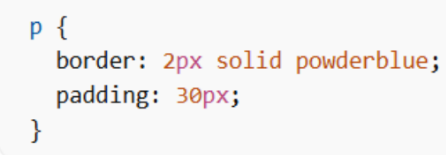
padding text aur border ke beech ka space define karta hai.
Example:
CSS Margin
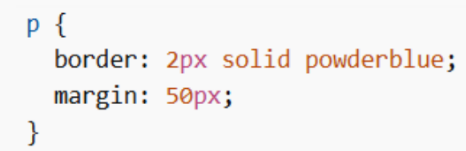
margin border ke bahar ka space define karta hai.
Example:
Link to External CSS
External CSS ko full URL ya relative path se link kiya ja sakta hai.
Full URL:
<link rel=”stylesheet” href=”https://www.google.com/html/styles.css“>
Current website ke html folder se:
<link rel=”stylesheet” href=”/html/styles.css“>
Same folder se:
<link rel=”stylesheet” href=”styles.css“>
