
Website Layout in CSS ka matlab hai web page ko different sections me divide karna jaise header, navigation menu, main content aur footer.
Ye structure sabse common hota hai:
- Header
- Navigation Menu
- Main Content
- Footer
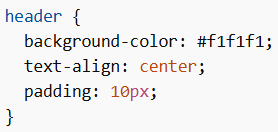
Website Layout in CSS Header
Header page ke top par hota hai aur usually logo ya website name contain karta hai.
Example
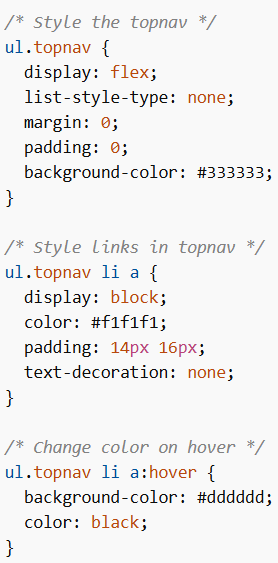
CSS Navigation Bar
Navigation bar links ka list hota hai jo users ko website me navigate karne me help karta hai.
Example
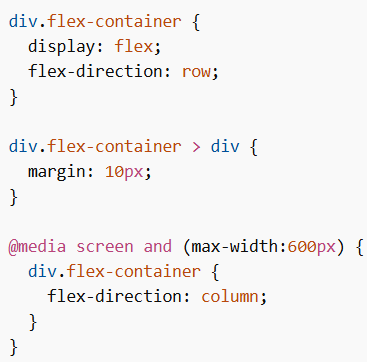
CSS Layout Content
Content layout device ke hisaab se change hota hai. Common layouts:
- 1-column (mobile)
- 2-column (tablet/laptop)
- 3-column (desktop)
Example (Responsive Layout)
CSS Footer
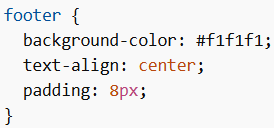
Footer page ke bottom me hota hai aur copyright ya contact info show karta hai.
Basic Footer Example
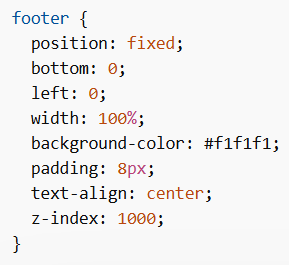
Fixed Footer Example
CSS Responsive Website
Responsive website banane ke liye media queries aur flexbox use kiya jata hai taaki layout screen size ke hisaab se adjust ho.
Website Layout in CSS web page ko structured aur organized banata hai. Header, navigation, content aur footer milkar ek complete layout create karte hain. Responsive techniques use karke layout ko har device ke liye optimize kiya ja sakta hai.
