
Position in CSS ek important concept hai jo web page me elements ki placement control karta hai. Position in css ka use web page me elements ki placement control karne ke liye hota hai.
Iske through tum normal document flow ko override kar sakte ho aur elements ko exact jagah par set kar sakte ho.
Position in CSS Property
Position property define karti hai ki element ka positioning type kya hoga.
Iske values ho sakte hain:
- static – default value
- relative – normal position ke relative move hota hai
- fixed – viewport ke according fix ho jata hai
- absolute – nearest positioned parent ke according place hota hai
- sticky – scroll ke basis par relative se fixed ban jata hai
Elements ko final position dene ke liye:
topbottomleftright
use kiye jate hain.
Types of Position in CSS
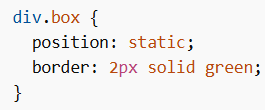
CSS position: static
Sabhi HTML elements by default static hote hain.
- Normal document flow follow karta hai
top, bottom, left, rightka koi effect nahi hota
Example
CSS position: relative
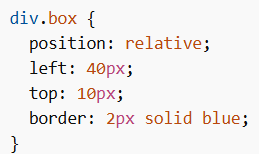
Element apni original position ke relative move hota hai.
- Tum
top, left, right, bottomse adjust kar sakte ho - Baaki content apni jagah change nahi karta
Example
CSS position: fixed
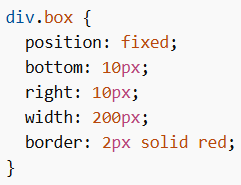
Element viewport ke relative fix ho jata hai.
- Scroll karne par bhi same position me rehta hai
- Page me gap nahi chhodta
Example
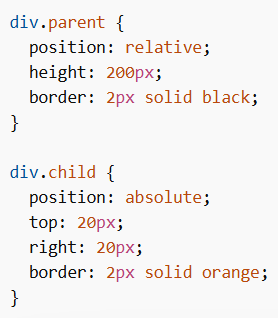
CSS position: absolute
Element nearest positioned parent (non-static) ke relative hota hai.
- Agar koi positioned parent nahi hai → body ke relative hoga
- Normal flow se remove ho jata hai
- Dusre elements ke upar overlap kar sakta hai
Example
Positioning Text on Image
Text ko image ke upar place karne ke liye:
- Parent ko
position: relative - Text ko
position: absolute
Isse tum text ko corners ya center me place kar sakte ho.
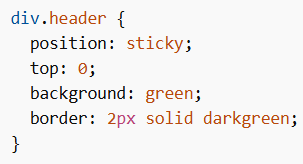
CSS position: sticky
Element relative + fixed ka combo hota hai.
- Initially relative behave karta hai
- Scroll hone par fix ho jata hai
Important:
top,bottom,left, yarightme se kam se kam ek dena zaruri hai
Example
Common Uses of Sticky
- Sticky headers (navbar upar chipak jata hai)
- Sticky sidebar (side content visible rehta hai)
- Sticky table headers
Sticky vs Fixed
| Feature | position: sticky | position: fixed |
|---|---|---|
| Initial behavior | relative jaisa behave karta hai | hamesha fixed rehta hai |
| Space in document | space leta hai initially | koi space nahi leta |
| Scroll behavior | threshold ke baad stick hota hai | always fixed |
| Container bound | parent ke andar rehta hai | viewport ke according hota hai |
