

Tables in HTML web developers ko data ko rows aur columns me arrange karne ki facility dete hain. Tables in HTML ka use structured data jaise schedules, marksheets, reports, ya product lists dikhane ke liye hota hai.
Table of Contents
ToggleDefine an HTML Table
Tables in HTML rows aur columns ke andar table cells se milkar banti hain.
Example:
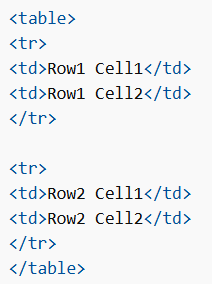
Table Cells
Tables in HTML me har table cell <td> aur </td> tag se define hoti hai.
-
tdka matlab table data hota hai -
<td>aur</td>ke beech ka content hi cell ka content hota hai
Example:
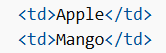
Table Rows
Tables in HTML me har table row <tr> se start hoti hai aur </tr> par end hoti hai.
-
trka matlab table row hota hai -
Aap table me jitni chahe rows bana sakte ho
-
Har row me cells ka number same hona chahiye
Example:
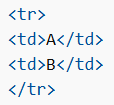
Table Headers
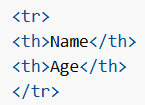
Tables in HTML me agar aap cells ko header banana chahte ho to <td> ki jagah <th> tag use karo.
-
thka matlab table header hota hai -
Default me header bold aur centered hota hai
Example:
HTML Table Borders
Tables in HTML me borders bhi add kiye ja sakte hain.
How to Add Borders
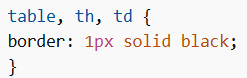
Border lagane ke liye CSS border property use hoti hai table, th, aur td par.
Example:
Double Border Hatao (border-collapse)
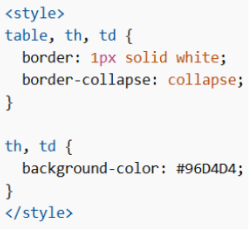
Kabhi kabhi borders double dikhte hain.
Isko fix karne ke liye:

Ye borders ko merge karke ek single smooth border bana deta hai.
Invisible Border Effect
Agar har cell ka background color set karo aur border ko white (page background jaisa) kar do, to border invisible jaisa lagega.
Example:
Rounded Borders (Soft Corners)
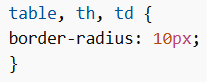
Border ko rounded banana ho to border-radius use karo.
Example:
Different Border Styles
Tables in HTML me alag-alag border styles use kiye ja sakte hain, jaise:
-
solid
-
dotted
-
dashed
-
double
-
groove
-
ridge
Changing Border Color
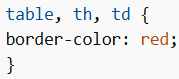
Border ka color change karne ke liye border-color property use hoti hai.
Example:
HTML Table Sizes
Tables in HTML me har column, row ya poori table ka size set kiya ja sakta hai.
Size set karne ke liye style attribute ke saath width ya height properties use hoti hain.
HTML Table Width
Table ki width set karne ke liye <table> element par style attribute add karo.
Example:

Note: Percentage unit ka matlab hai ki table parent element ke comparison me kitni wide hogi.
HTML Table Column Width
Specific column ka size set karne ke liye <th> ya <td> par style attribute add karo.
Example:

HTML Table Row Height
Specific row ki height set karne ke liye <tr> par style use karo.
Example:

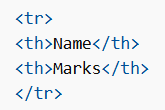
HTML Table Headers
Tables in HTML me headers columns ya rows dono ke liye ho sakte hain.
Headers <th> element se define hote hain.
Example:
Align Table Headers
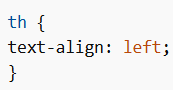
Default me headers bold aur centered hote hain.
Left align karne ke liye:
Header for Multiple Columns
Ek header ko multiple columns par span karne ke liye colspan attribute use hota hai.
Example:

Note: colspan aur rowspan ke baare me aap Table colspan & rowspan chapter me aur detail me seekhoge.
Table Caption
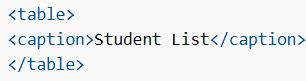
Tables in HTML me poori table ke liye heading add karne ke liye <caption> tag use hota hai.
Example:
HTML Table Padding & Spacing
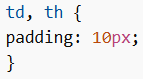
Tables in HTML cells ke andar padding aur cells ke beech spacing adjust kar sakti hain.
Cell padding ka matlab hai cell edges aur content ke beech ka space.
Default padding 0 hoti hai.
Example:
Sirf top padding ke liye:
-
padding-top -
padding-bottom -
padding-left -
padding-right
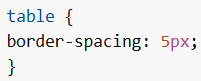
HTML Table Cell Spacing
Cell spacing ka matlab hai cells ke beech ka space.
Default spacing 2 pixels hoti hai.
Space change karne ke liye:
HTML Table Colspan & Rowspan
Tables in HTML me kuch cells multiple rows ya columns par span kar sakte hain.
HTML Table – Colspan
Ek cell ko multiple columns par span karne ke liye colspan attribute use hota hai.
Example:

Note: colspan value batati hai kitne columns par cell span karega.
HTML Table – Rowspan
Ek cell ko multiple rows par span karne ke liye rowspan attribute use hota hai.
Example:

HTML Table Styling
Tables in HTML ko CSS se aur attractive banaya ja sakta hai.
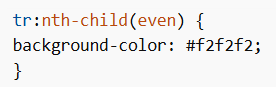
HTML Table – Zebra Stripes
Agar har dusri row par background color add karo to zebra stripes effect milta hai.

Example:
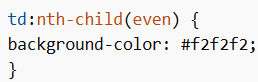
HTML Table – Vertical Zebra Stripes
Rows ki jagah columns par stripes banane ke liye:

Example:
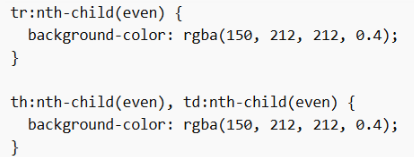
Combine Vertical and Horizontal Zebra Stripes
Agar dono styles combine karo to rows aur columns dono par stripes milengi.
Transparency ke liye rgba() color use kiya ja sakta hai.
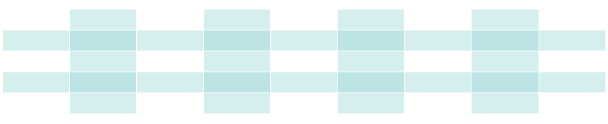
Example:
HTML Table Colgroup
Tables in HTML me <colgroup> element ka use specific columns ko style karne ke liye hota hai.
Example:

<colgroup> column specifications ka container hota hai aur har group <col> element se define hota hai.
-
span→ kitne columns par style apply hoga -
style→ column ka style define karta hai
Note:
<colgroup> tag <table> ka child hona chahiye aur ise <thead>, <tr>, <td> se pehle place karna chahiye. Agar <caption> ho to caption ke baad.
Legal CSS Properties for Colgroup
<colgroup> me sirf kuch CSS properties allowed hoti hain:
-
width -
visibility -
background -
border
Baaki CSS properties ka tables par effect nahi hoga.
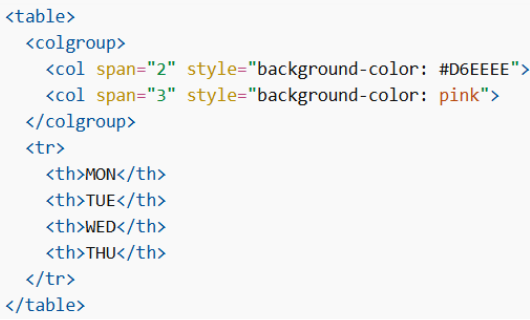
Multiple Col Elements
Agar multiple columns ko alag style dena ho to <colgroup> ke andar multiple <col> elements use karo.
Example:
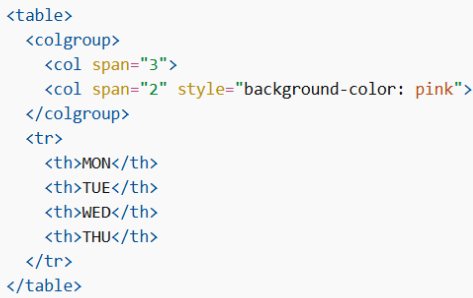
Empty Colgroups
Agar table ke beech ke columns ko style karna ho, to pehle ke columns ke liye empty <col> element insert karo.
Example:
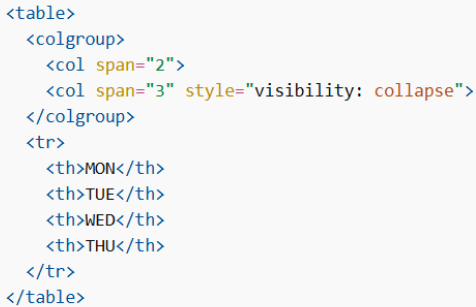
Hide Columns
Columns ko hide karne ke liye visibility: collapse property use ki ja sakti hai.
Example:
Is tarah Tables in HTML web pages par structured data ko rows aur columns ke form me organize karne ka powerful aur flexible tarika provide karte hain, jisse information ko clearly display aur manage kiya ja sakta hai.
