
HTML me kuch special elements hote hain jo text ko sirf stylish nahi, meaningful bhi banate hain. Usko ham formatting in HTML bolte hai.
Example:
HTML Formatting Elements
Chalo ab ham formatting in HTML examples se sikte hai. Diye gaye elements special type ka text dikhane ke liye use hote hain:
- <b> – Bold text
- <strong> – Important text
- <i> – Italic text
- <em> – Emphasized text
- <mark> – Highlighted text
- <small> – Chhota text
- <del> – Deleted text
- <ins> – Inserted text
- <sub> – Subscript
- <sup> – Superscript
HTML <b> and <strong> Elements
<b> text ko bold karta hai, extra importance nahi deta.
Example:

<strong> text ko bold bhi karta hai aur batata hai ki ye important hai.
Example:

HTML <i> and <em> Elements
<i> text ko italic kar deta hai. Yeh Alternate voice, technical term, foreign word, thought, etc. ke liye use hota hai.
Example:

<em> bhi italic dikhata hai, but emphasis ke saath.
Example:

HTML <small> Element
<small> ke help se text ka size thoda chhota ho jata hai.
Example:

HTML <mark> Element
<mark> text ko highlight karta hai (usually yellow background).
Example:

HTML <del> Element
<del> use karke text pe strike-through line aa jati hai.
Example:

HTML <ins> Element
<ins> inserted text ko underline karta hai.
Example:

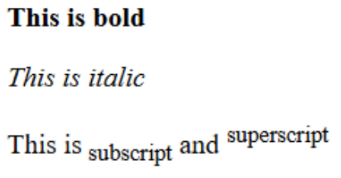
HTML <sub> and <sup> Elements
<sub> – Text normal line se thoda neeche chala jata hai.
<sup> – Text normal line se thoda upar chala jata hai.
Example:

Aur bhi bohot sare formatting in HTML hote hai. Aap khud se bhi text editor ke madat se try kar sakte ho.
